



Description
xDescription:
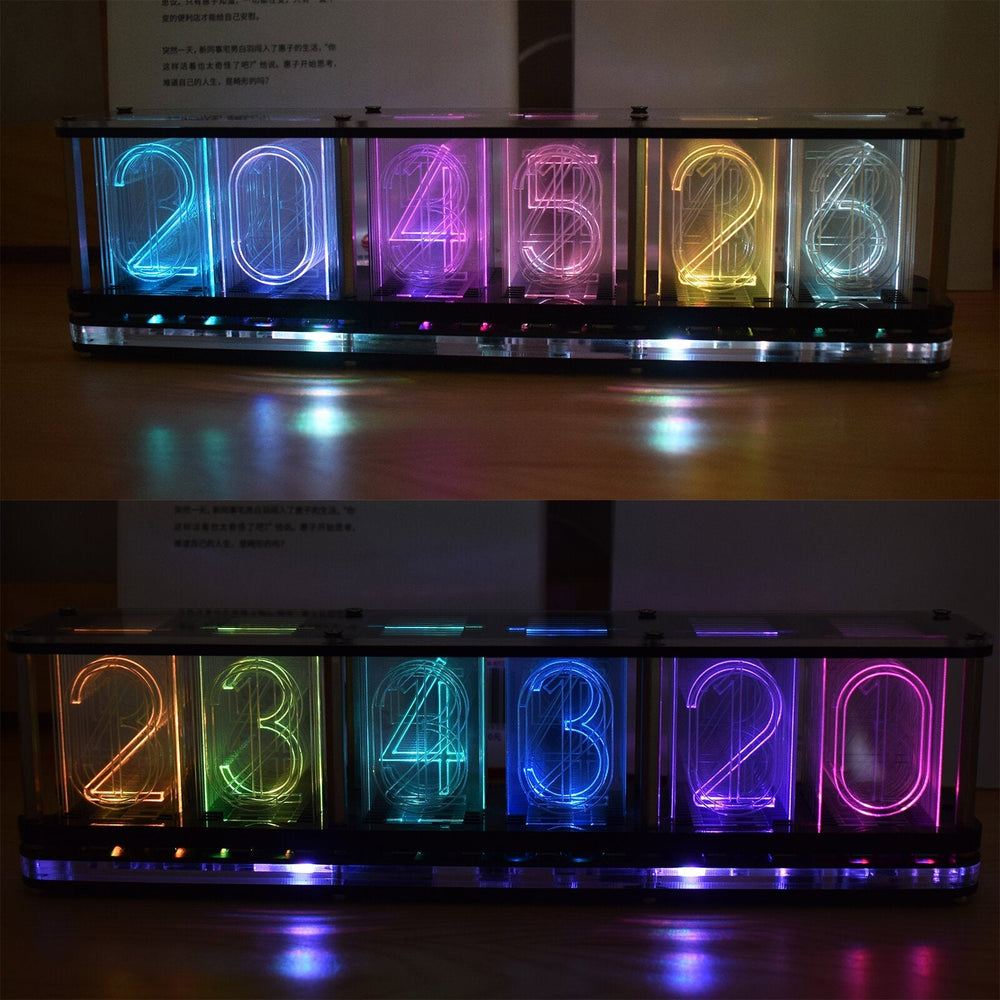
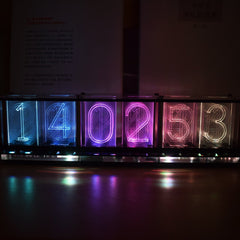
Using boldfaced digital numbers, a better clock display effect can be reflected through the transparent acrylic plate, and the display effect of a glow clock can be simulated. You can switch to the option of music spectrum display effect by touching the button. Just turn on the music playback device and place the clock on the side to display the music b0unce effect. A variety of rainbow RGB color gradient display effects are built-in, the favorite color of each number can also be fixed. You can also set to automatically switch the display of time, temperature, date and week information, and you can also choose different switching animation effects.
Features:
Boldfaced word digital display effect;
Music spectrum display function;
Simulate glow clock effect;
Highlight RGB color lights;
High precision DS3231 clock chip;
Put in CR2032 backup battery to prevent loss of time data after power failure;
Touch button control;
Multiple color change effects;
Time, temperature, date and week multiple automatic switching effect display;
With alarm function;
Voice-activated wake-up function;
Various bottom side light effects;
Dark light automatically enters the low-brightness display function;
6-digit digital display color function can be customized;
A variety of time hour and half hour reminder animation special effects;
A variety of conversion effects displayed in seconds;
Countdown function;
Stopwatch function;
The speed of color change can be set;
Touch the key to halt the color change at any time;
Long press to switch between time mode and music spectrum mode;
Automatically save setting data when power off;
Multi-layer acrylic shell;
USB DC 5V power supply;
Overall size: 252mm*46mm*70mm;
Weight: 520g.
Function:
Long press the setting key (square icon) to switch: Clock mode function-Music spectrum display function;
Short press the setting button (square icon) to halt the color change;
Short press the switch button (triangular icon) to switch the color effect;
Color effect list:
1- Rainbow gradient effect;
2- Two grid cool color gradient effect;
3- Aurora color gradient effect;
4- Two grid rainbow gradient;
5- Full color gradient effect;
6- Two-cell Aurora color gradient effect;
7- Cool aurora gradient effect;
8- Full color same color gradient effect;
9- Display custom colors.
In clock mode:
1: Press setting (square icon) + switch touch key (triangular icon) at the same time to enter or exit the menu;
2: Short touch the switch key (triangular icon) to switch:
[number 0] time setting-[number 1] date setting-[number 2] alarm setting-[number 3] format setting-[number 4] switching effect selection-[ Number 5] Switching duration setting-[Number 6] LED effect selection at the bottom-[Number 7] Switch automatic dimming function-[Number 8] Switch voice-activated wake-up function-[Number 9] Custom number color-[Number 10] Set the hourly and half-hourly chime animation effect-[Number 11] Set the second digital conversion effect-[Number 12] Countdown function-[Number 13] Stopwatch function-[Number 14] Set the color gradation speed-[Number 15]Test the quality of LED.
Short press the setting key (square icon) to enter the setting, and then use the switch key (triangular icon) to modify the parameter value.
Clock mode parameter setting:
【Number 0】Time setting:
Switch key (triangular icon) to modify the flashing parameter value, set key (square icon) to confirm the modification;
【Number1】Date setting:
The modification order is: year-month-day;
【Number 2】Alarm clock:
1-Turn on the alarm and enter the alarm time setting;
2-0- Turn off the alarm.
【Number 3】 Format setting (Format):
[0] (Hour format): 24-24 hour system mode; 12-12 hour system mode.
[1]: (Date format): 12-31: month-day mode; 31-12: day-month mode.
[2]: (temperature format): Celsius and Fahrenheit;
【Number 4】Switching effect selection:
0-[Only time display];
1- Sweeping effect from left to right;
2- Overall sweeping effect;
3- The middle to the two sides one by one lighting effect;
4- Light up the effect one by one from left to right;
5- Random sweep effect;
6-Sweeping effect from the middle to both sides;
(Note: The order of switching display is: time-temperature-date week).
【Number 5】Switching duration setting:
(5) Switch every 5 seconds;
(10) Switch every -10 seconds;
(30) Switch every -30 seconds;
(60) Switch every -60 seconds;
(5min) Switch every 5 minutes;
(10min) Switch every 10 minutes;
(15min) Switch every 15 minutes;
(30min) Switch every 30 minutes;
(60min) Switch every 60 minutes;
【Number 6】LED effect selection at the bottom:
0-[Turn off the bottom LED effect];
1- Rainbow color gradient;
2- Press the button to turn off the light;
3- Cool color gradient;
4- Cand1elight color effect;
5- Aurora color gradient;
【Number 7】Switch automatic dimming function:
0- Turn off dark mode;
1- Turn on the automatic dark mode (when the ambient light is detected to be dark, it will automatically enter the low brightness mode);
【Number 8】Switch voice-activated wake-up function:
0- Turn off the voice-activated wake-up function;
1- Turn on the voice-activated wake-up function (tap the desktop or press any touch button to wake up);
【Number 9】Customize the color of the number:
Switch key (triangular icon) to modify the color value of the flashing number (a total of 17 colors), set key (square icon) to confirm the modified color and enter the color setting of the next number;
【Number 10】 Set the hourly and half-hourly chime animation effect:
0-[No conversion effect];
1- Sweeping effect;
2- Fading effect;
3- Mixing effect (the hourly chime enters the sweep effect, the half-hourly chime enters the fade effect);
【Number 11】Set the digital conversion effect of seconds:
0-[No transf0rmation effect];
1- Digital progressive effect;
2- Digital breathing effect;
3- Mixed effect (automatically switch every day);
【Number 12】Countdown function:
Enter the minutes and seconds, press the set button (square icon) to start the countdown, the countdown ends the buzzer buzzer, and any touch key to exit the countdown;
【Number 13】Stopwatch function:
Press the switch button (triangle icon) to start timing, press again to halt timing, and press again to reset the timer (maximum timing is 99 minutes, 60 seconds, and 990 milliseconds).
Switch key function cycle: start timing-halt timing-timing reset;
Press the set button (square icon) to exit the stopwatch function;
【Number 14】Set the color gradient speed:
Seven level settings 1-7: from fast to slow;
【Number 15】Test the quality of LED:
Press the switch key (triangular icon) to switch the test color. A total of three colors of red, green and blue are tested.
Press the set key (square icon) to exit the test.
In music spectrum mode:
Short press the setting key (square icon) to halt the color change at any time, so that the favorite color can be displayed fixedly;
Short press the switch key (triangle icon) to switch between different color gradient effects;
Enter the music spectrum mode, you only need to put out the music playback device (mobile phone, speaker, MP3 player, etc.) to display the music spectrum b0unce effect, the effect is better when placed on the back of the microphone.
Package Included:
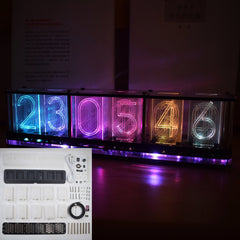
1 x Semi-finished Imitate Glow Clock Kit
Additional Information
xNam tempus turpis at metus scelerisque placerat nulla deumantos solicitud felis. Pellentesque diam dolor, elementum etos lobortis des mollis ut risus. Sedcus faucibus an sullamcorper mattis drostique des commodo pharetras loremos.Donec pretium egestas sapien et mollis. Pellentesque diam dolor cosmopolis etos lobortis.
- Comodous:
- Comodous in tempor ullamcorper miaculis
- Mattis laoreet:
- Pellentesque vitae neque mollis urna mattis laoreet.
- Divamus de ametos:
- Divamus sit amet purus justo.
- Molestie:
- Proin molestie egestas orci ac suscipit risus posuere loremous
Shipping & Return
xReturns Policy
You may return most new, unopened items within 30 days of delivery for a full refund. We'll also pay the return shipping costs if the return is a result of our error (you received an incorrect or defective item, etc.).
You should expect to receive your refund within four weeks of giving your package to the return shipper, however, in many cases you will receive a refund more quickly. This time period includes the transit time for us to receive your return from the shipper (5 to 10 business days), the time it takes us to process your return once we receive it (3 to 5 business days), and the time it takes your bank to process our refund request (5 to 10 business days).
If you need to return an item, simply login to your account, view the order using the "Complete Orders" link under the My Account menu and click the Return Item(s) button. We'll notify you via e-mail of your refund once we've received and processed the returned item.
Shipping
We can ship to virtually any address in the world. Note that there are restrictions on some products, and some products cannot be shipped to international destinations.
When you place an order, we will estimate shipping and delivery dates for you based on the availability of your items and the shipping options you choose. Depending on the shipping provider you choose, shipping date estimates may appear on the shipping quotes page.
Please also note that the shipping rates for many items we sell are weight-based. The weight of any such item can be found on its detail page. To reflect the policies of the shipping companies we use, all weights will be rounded up to the next full pound.
Custom Tab
x| Drostique | Nam tempus turpis at metus scelerisque placerat nulla deumantos |
| Pharetro Lorem | Pellentesque diam dolor elementum etos lobortis des mollis |
| Milancelos | Donec pretium egestas sapien et mollis |
| Pellentesque | Sedcus faucibus an sullamcorper mattis drostique des commodo pharetras |
| Proin Molestie | Pellentesque diam dolor elementum etos lobortis des mollis |
| Cosmopolis | Donec pretium egestas sapien et mollis |

- Choosing a selection results in a full page refresh.